
What is Facebook Auto Reply?
Facebook Auto Reply is an automation feature that allows you to automatically respond to users who comment on your Facebook posts. Instead of manually replying to each comment, auto reply tools like OmnifitAI enable you to configure predefined messages—or even AI-generated responses—that are instantly sent as either public comments or direct messages (DMs). This functionality ensures your page remains active, responsive, and engaging—without requiring constant manual effort.Benefits of Facebook Auto-Reply:
- Instant User Engagement: Respond to inquiries, feedback, or interest the moment a user comments.
- Improved Customer Experience: Show your users they’re being heard and valued by responding promptly.
- Higher Lead Conversion: Convert casual commenters into leads or customers with automated follow-up messages and chatflows.
- Brand Trust & Responsiveness: Build a professional image with consistent and timely replies.
- Scalability: Handle high comment volumes effortlessly during campaigns, product launches, or peak hours.
To setup your Auto-Reply feature for Facebook
- Log into your OmnifitAI Account and go to the Facebook Bot.
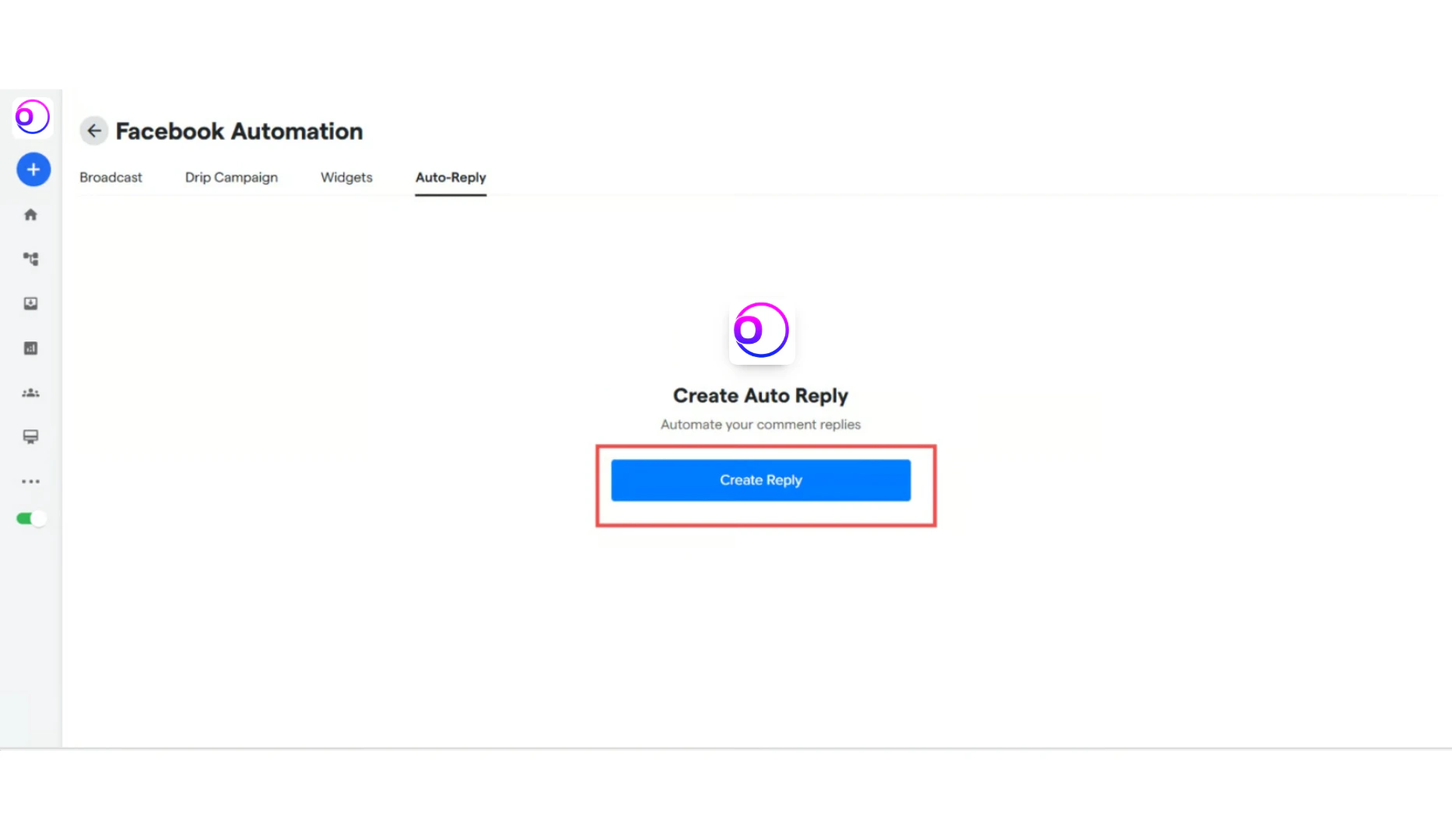
- Click on the “Facebook Automation” settings, and then go to “Auto-Reply”.
-
Click on “Create Reply”.
-
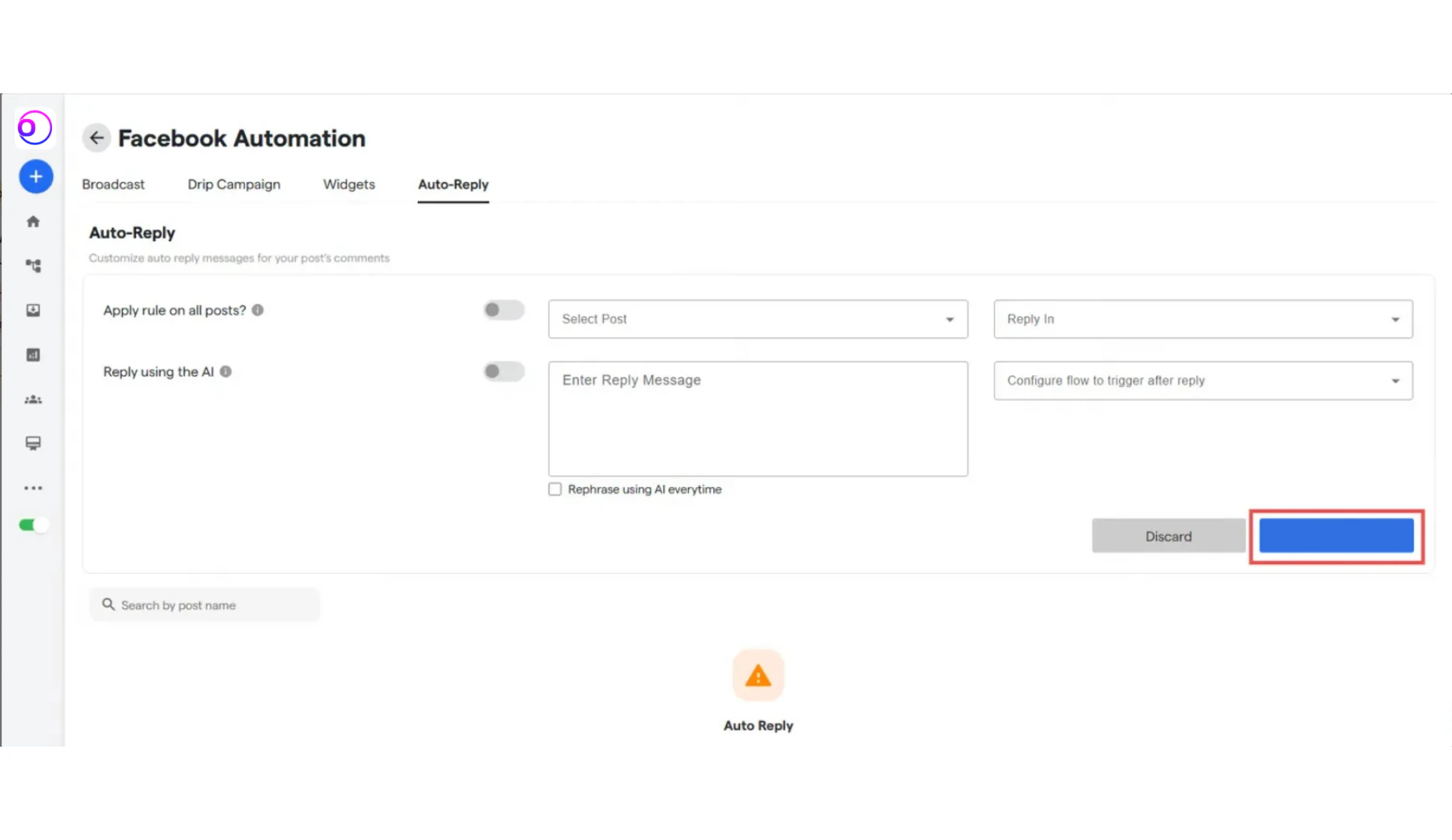
Fill the following details:
- Select Post: Choose the specific post you want to activate Auto Reply on. You can also click on the “Apply rule on all posts” to put the automation on all posts.
- Reply In: Choose to reply in Direct Message or Comments.
-
Custom Message or AI-Based Response:
- Manually write the message that will be sent as a reply.
- Or enable “Reply Using AI” to let the system automatically generate a smart, context-aware reply.
-
Trigger a Follow-Up Flow: You can attach a chatbot flow that will activate if the user responds to the auto reply, allowing for deeper engagement and automated handling of complex queries or lead qualification.
For the “Reply using AI”, make sure some AI platform is integrated into the chatbot for th proper working of the same.
FAQ’s:
Here are some common FAQ’s regarding Facebook Auto-Replies:Why is my Auto-Replying giving same message as the user input back?
Why is my Auto-Replying giving same message as the user input back?
This is because the chatbot is not integrated with an AI agent. Integrate an AI agent to solve this issue.
Can I set up an autoreply based on user behavior, such as previous message or action taken in the conversation?
Can I set up an autoreply based on user behavior, such as previous message or action taken in the conversation?
No, currently all the comments on a post will be responded to.
Can the autoreply feature send multimedia (images, videos) along with text responses?
Can the autoreply feature send multimedia (images, videos) along with text responses?
No, the auto-reply feature currently send only text message back. However, if the user responds, then the flow that is triggered can have images/videos in them.
How do I test the accuracy of my autoreplies before making them live?
How do I test the accuracy of my autoreplies before making them live?
You can test the Auto-reply by going onto the test page on the top-right and try it out.
How can I ensure my autoreply messages maintain brand voice and tone consistency?
How can I ensure my autoreply messages maintain brand voice and tone consistency?
Using AI, make a persona that is to the brand voice and tone that you like, and using the Reply using the AI. Alternatively, you can put a customer message, and click the Rephrase using AI every time
Is it possible to update or modify autoreply responses based on ongoing feedback or performance analytics?
Is it possible to update or modify autoreply responses based on ongoing feedback or performance analytics?
Yes, using the analytics from the analytics window, as well as reading the chats in the Inbox, we can get a good idea of the autoreplies validity and change the response by changing the persona and the message in the reply.